Watercolor Flower Art Brush Wedding Set: A Designer's Toolkit
There's a specific feeling that authentic watercolor art brings to a design. It’s organic, soft, and carries a handmade quality that digital tools often struggle to replicate. When you're working on a project that needs a touch of natural elegance, like a wedding invitation or a boutique brand's logo, starting from scratch can be time-consuming. That's where a versatile asset like the Watercolor Flower Art Brush vector set comes in. It’s a collection designed not just as static images, but as a flexible toolkit for creatives who know their way around Adobe Illustrator. This set provides the building blocks to craft beautiful, professional designs with that sought-after hand-painted aesthetic.
The Anatomy of an Organic Design Asset
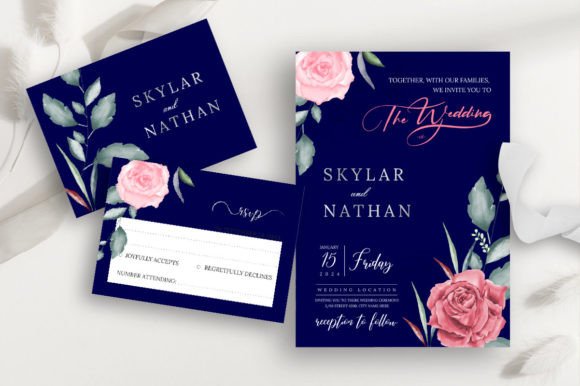
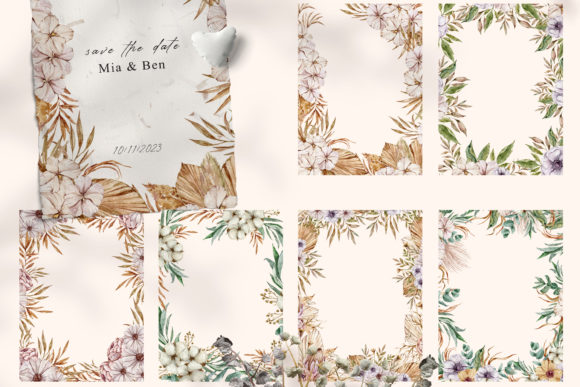
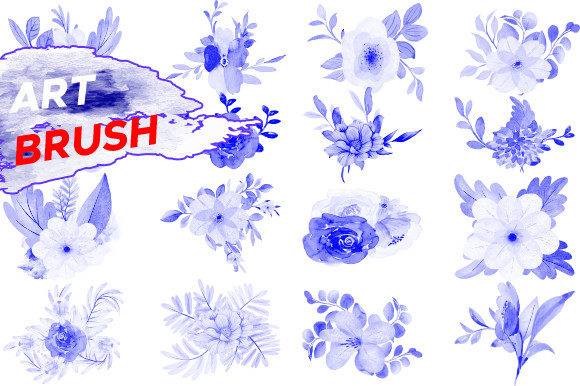
At its core, this isn't just a single illustration. It’s a comprehensive Watercolor Flower Art Brush set containing 16 distinct floral elements. Each piece is crafted with the delicate, transparent layering and soft edges characteristic of real watercolor paintings. You’ll find everything from simple leaf sprigs to full, blooming roses, giving you a complete botanical vocabulary to work with. The visual personality is inherently romantic and gentle, making it a natural fit for wedding stationery. However, its style is versatile enough to feel modern and fresh when paired with the right typography.
The true power of this vector file template lies in its format. Because the illustrations are provided as Adobe Illustrator brushes, you're not just placing a static image onto your canvas. You can paint with these floral elements along any path you create. Imagine drawing a custom curve for a logo's underline and having it instantly filled with a delicate vine. Or creating a unique border for a menu by simply stroking a rectangle with a floral brush. This approach offers a level of customization that static JPEGs or PNGs cannot match. The included files—AI, EPS, PSD, JPEG, and PNG at 300 DPI—ensure you can integrate these assets into almost any workflow, whether your final output is for digital screens or high-quality print.
Practical Applications Beyond the Wedding Suite
While the name highlights weddings, the applications for this creative font asset extend far beyond. Its clean, illustrative style makes it a powerful tool for a wide range of projects. Think about the needs of a small business owner launching a skincare line. Using these floral elements on packaging design can instantly communicate a natural, artisanal quality. A blogger could use them to create unique social media graphics that stand out in a crowded feed, establishing a consistent and recognizable visual brand identity.
For designers and marketers, this set is a valuable addition to your library of design assets. Here are a few practical ways it can be used:
- Brand Identity: Develop a complete visual system for a lifestyle brand, a florist, or a café. Use the brushes to create a unique logo, secondary marks, and patterns for stationery and merchandise.
- Editorial Design: Enhance magazine layouts, book covers, or blog post headers. A delicate floral border can frame a feature story beautifully without overpowering the main typography.
- Digital Products: Design printable planners, greeting cards, or wall art. The high-resolution files ensure crisp, clean prints every time.
- Packaging and Labels: Add a touch of elegance to product labels for candles, soaps, or gourmet foods. The watercolor style suggests quality and care.
The key is to see it as a component of your larger design toolkit. It works wonderfully alongside a strong sans serif font for a modern look or a classic serif font for a more traditional feel. This ability to complement other typeface choices makes it an incredibly flexible premium font asset.
Working with the Vector Template: A Practical Guide
If you have a basic understanding of Adobe Illustrator, integrating this set into your projects is straightforward. The files are organized and clearly labeled, which simplifies the process. Here’s a simple workflow to get started:
- Install the Brushes: Open the .AI file and navigate to the Brushes panel. You can easily load these brushes into your Illustrator library, making them accessible across all your projects.
- Create Your Path: Use the Pen Tool, Pencil Tool, or any shape tool to draw the path or line you want to become floral.
- Apply the Brush: With your path selected, simply click on one of the floral brushes in your panel. The vector illustration will automatically conform to the shape of your path.
- Customize and Edit: This is where the vector nature shines. You can change the stroke color to any hue, adjust the stroke weight to make the flowers larger or smaller, and use the Width Tool for more organic variation. Because it's a vector file template, everything is infinitely scalable without losing quality.
This process allows for rapid experimentation. You can test different font pairings and layouts quickly, building out a full logo design or a cohesive set of social media graphics in a fraction of the time it would take to draw each element by hand. The easily editable nature of the design means you can tweak every petal and leaf to perfectly match your project's color palette and style.
Making the Most of Your Design Assets
Choosing the right design asset is about more than just aesthetics; it's about finding a tool that solves a problem and enhances your creative process. The Watercolor Flower Art Brush set excels because it offers both beauty and utility. It provides the visual appeal of hand-painted art with the precision and scalability of modern vector graphics. This balance is crucial for maintaining professionalism in your work, whether you're a freelance designer building a client's brand or a hobbyist creating invitations for a friend's event.
Before committing to a design direction, always test how the asset performs in context. Place your floral typography next to your body copy. See how it looks at different sizes. Does it maintain its clarity? Does it support the overall message or distract from it? A successful design is one where every element, from the primary display font to the smallest decorative brush, works in harmony. This watercolor set is designed to be a collaborative element, one that enhances rather than dominates. By treating it as a versatile component in your larger creative strategy, you can unlock its full potential and bring a unique, organic touch to a wide array of projects.